
Hodman.ai
The web workspace and Hodman API stay hosted: sign-in, administration, tasks, conversations and coordination with your execution agent.
Hybrid on-premises
Your team uses the Hodman web workspace. An execution agent on your server runs project code and reaches the internal systems you authorize, without giving those systems a public endpoint.
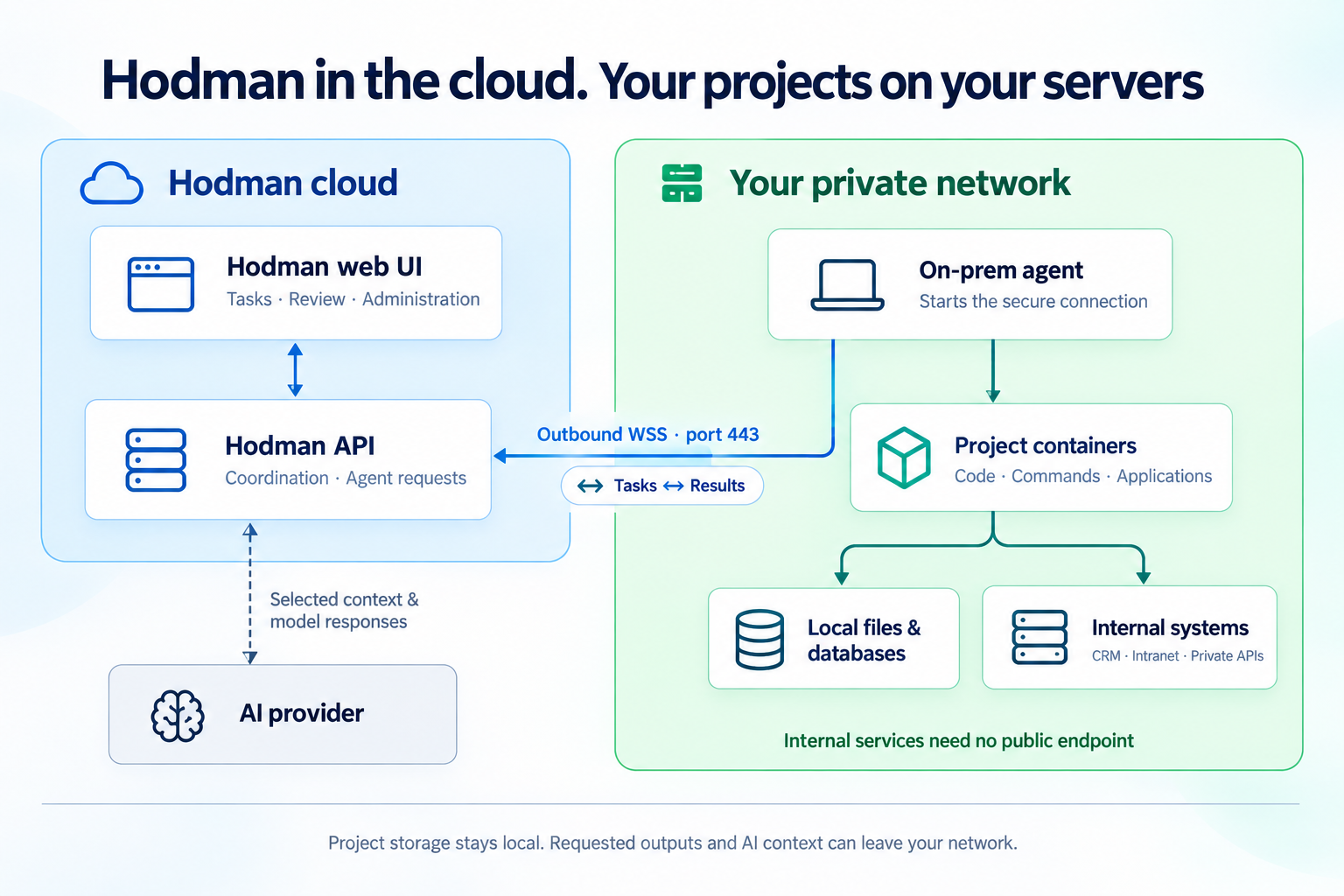
The web workspace and Hodman API stay hosted: sign-in, administration, tasks, conversations and coordination with your execution agent.
Your execution agent manages Docker project containers, local files and databases. Project code reaches approved internal APIs and services from inside your network.
AI work uses your supported subscription, API key or optional Credits. The selected provider may receive task context and tool outputs; on-prem execution does not make model inference local.
Give a project read access to a database on your private network. Its code queries the database locally and serves a dashboard through your internal ingress or VPN. Your team can ask Hodman to change the dashboard, inspect the preview and review the result. Decide which query results and logs the agent may return to the hosted workspace and AI provider.
The execution agent connects to Hodman. It does not need an inbound management port. Preview, application access and webhooks need their own network setup. External providers and registries may also require outbound access.
Use scoped credentials, read-only connections where possible and output filtering in each connector. Data Protection Policy can guide masking implementation, but it is not an automatic network-wide filter. Test which data reaches the workspace and model before connecting sensitive systems.
Code or command results requested for a task can be sent to Hodman and your AI provider. Restored values may be cached by Hodman. This is not an offline installation or a guarantee that no company data leaves your network.
Public Docker Hub distribution is being prepared. The setup guide describes the planned public-image installation; use a release tag confirmed by your administrator.
Give your coding agent the installation guide.
Install the execution package on a dedicated server or VM.
Authorize the runtime in your Hodman workspace.
Verify a test project and its access path before connecting production data.
The execution agent controls the Docker daemon. Use a dedicated host, review its privileges and back up local data. A publicly downloadable image does not by itself mean the software is open source.
Ultra workspace plan
On-premises execution is available with Ultra. Your server, AI provider and infrastructure costs are paid separately.